


GuideOn Military
3.7125.00 Reviews
App Specs
- Version
- 3.1.21
- Updated On
- License
- Free
- Downloads
- 100,000+
- Developer
- OneDot Solutions LLC
- Categories
- Travel & Local
- Platform
- Android
Screenshots


 Analysis by AppCompare
If you’re new to military installations, it helps to know what a guide like this can and cannot do before you rely on it. GuideOn Military is a free travel and local app from OneDot Solutions LLC, built around finding military locations and useful information for the military community. I’d treat it as a place to begin exploring an installation, not as a substitute for official instructions or a current local contact when details matter.
What to expect from a military-focused guide
The main appeal is its focus. General map apps are useful for getting from one address to another, but they don’t necessarily organize places and information around the needs of people visiting or living near a military installation. GuideOn is intended to make that kind of discovery more direct: you can look for an installation and then use its military-oriented information as a starting point for planning.
That focus is most useful when you already have a reason to visit a particular base, are preparing for a move, or are helping a family member get familiar with an unfamiliar area. It is less compelling if you only need ordinary road directions around town. In that case, a mainstream navigation app may be quicker, more familiar, and better suited to live traffic decisions.
The app has been available since August 2014, and its current version is 3.1.21. It has a 3.7 average from 328 ratings and more than 100,000 installs. Those figures suggest that it has found an audience, while the middling rating is a sensible reminder to approach it as a practical resource rather than assume every experience will be seamless. It is rated for everyone, though the military context will naturally matter more to some users than others.
Make your first visit useful
When you open the app for the first time, begin by choosing the location or installation you actually need. If you are planning ahead, select the destination rather than relying only on where your phone is right now. That simple distinction can make the first session more useful: you can look around before travel day instead of trying to learn the layout while already on the move.
For a realistic example, imagine that you are visiting a base for an appointment and have not been there before. I’d use GuideOn beforehand to identify the relevant installation and get a broad sense of the places listed there. Then I’d check the appointment instructions for the exact arrival requirements and use a familiar navigation tool for the drive if I need live routing. That division of labor keeps the app helpful without asking it to answer questions it may not be designed to handle.
If you are moving, the ability to look beyond your current location is a more meaningful benefit than it may first appear. You can explore the destination before the move and start noting what you may want to investigate after arrival. I would avoid treating an initial search as a complete settling-in plan, though: use it to orient yourself, then confirm time-sensitive or important details with the relevant installation or service.
Worth Reading Before You Choose

EA SPORTS FC Mobile 26 Is a Bigger Football Game, but It Takes Time

Flipboard Shows What News Apps Must Do Beyond the Feed

Switching to Android Auto Means Rethinking Your Driving Routine

Google Calendar Makes a Crowded Week Easier to Manage

Ludo King Makes the Most of the Minutes Between Plans

Baby Panda World Brings Quick Play to Modern Phones, but Its Game Library Feels Busy
Getting Started with GuideOn Military
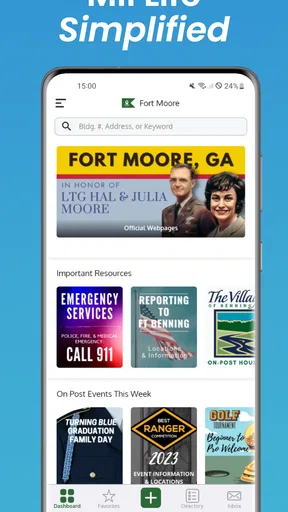
First things first, downloading GuideOn Military was a breeze. Available on both Android and iOS, the app's lightweight footprint was a pleasant surprise, especially if you're cautious about storage space. Once installed, diving into the app was straightforward thanks to its clean and intuitive interface.
Right from the get-go, the app prompts you to choose your location or the specific military installation you're interested in. A neat feature here is that it doesn't limit you to just your current location. You can explore other bases, which is perfect if you're planning a move or just curious about different installations.
Features that Stand Out
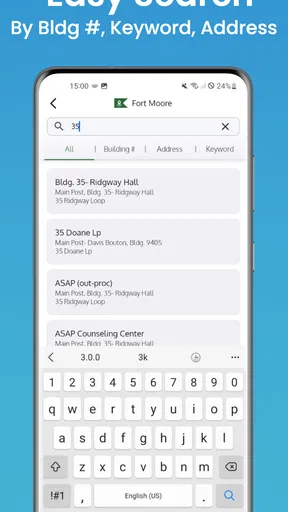
One of the app's standout features is its detailed directory of facilities. From gyms and medical facilities to dining and recreational spots, GuideOn Military ensures you’re never lost or wondering where to go next. The directory is comprehensive and, more importantly, regularly updated. This ensures that all the information is current, sparing users from any wild goose chases.
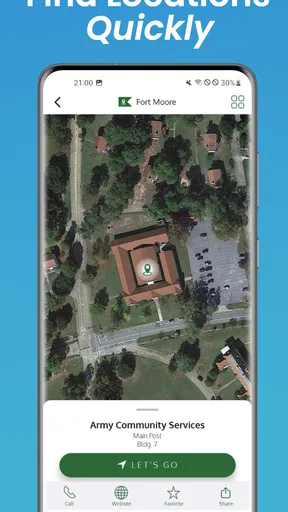
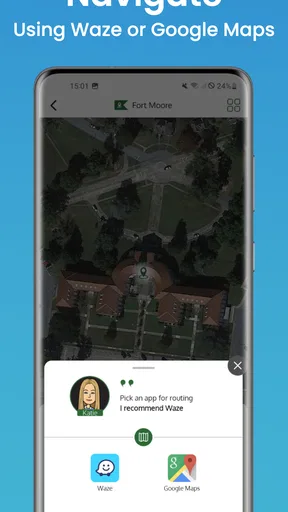
The map feature deserves a special mention. It's not just any map; it integrates smartly with your phone's GPS, offering turn-by-turn navigation. This is a godsend, especially in sprawling bases where everything looks the same. Plus, the app's offline capability means you won't be stuck if you hit a spotty reception area.
Community and Connectivity
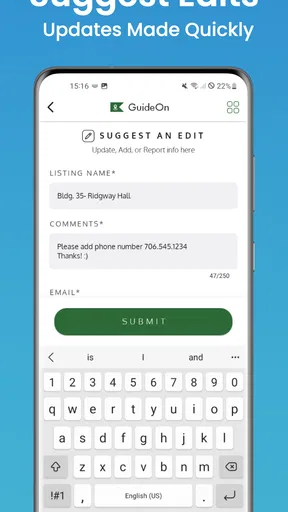
Another aspect I appreciated was the community-driven updates. Users can contribute reviews and suggestions, making it a living, breathing resource. If there’s a new coffee shop on base or a gym renovation, chances are someone has already noted it in the app.
Additionally, the app offers a messaging feature. Now, this isn’t your typical messaging app, but it provides a way to connect with others on base, which can be invaluable for newcomers or those looking to expand their social circle.
Usability and Experience
In terms of usability, it shines. The app runs smoothly, with no noticeable lag or glitches during my time with it. The design is minimalistic, which is great because it doesn't overwhelm you with too many buttons or options. Instead, it focuses on delivering essential information quickly and efficiently.
For those who are concerned about privacy, the app doesn’t overreach with permissions. It asks for what it needs, like location services, to function optimally, but nothing more. This transparency is refreshing and builds trust with the user.
Room for Improvement
While the app is impressive, there's always room for improvement. A more personalized experience could be beneficial. For instance, a feature where users can save their favorite places or routes would add a nice touch. Additionally, integrating more real-time updates, like weather alerts or base-specific announcements, could elevate the experience further.
Also, while the app is largely self-explanatory, a brief tutorial or guide upon first use could help new users understand all the features without any guesswork.
Practical limits and sensible habits
For a first-time user, the main thing to keep in mind is that a directory entry and a confirmed plan are not the same thing. Facilities can have rules, access requirements, or schedules that affect whether a visit works for you. I’d use the app to narrow down where to look, then check official instructions before setting out, especially for an appointment or a service that cannot easily be rescheduled.
Likewise, even when a map or offline capability is useful, I would prepare before leaving rather than assume every detail will be available in every situation. Open the destination while you have a reliable connection, get familiar with the general area, and keep any important address or instructions somewhere easy to revisit. This is a low-effort backup that matters most when you are unfamiliar with the installation or in a hurry.
Community contributions can add a human perspective that a standard map lacks, but they should be read as helpful context, not as official confirmation. A review may point you toward a place worth checking, while a change in access or operating arrangements may require a more authoritative source. That distinction is especially useful for visitors who do not already know which details are routine and which ones affect entry.
Who will get the most from it
I can see this being most useful for military community members, families preparing for a move, and visitors who want a military-specific starting point rather than a generic map full of unrelated results. It may also help someone who has recently arrived and wants to explore what is nearby before asking around in person. Its value comes from having that installation-focused lens, not from replacing every other travel tool on a phone.
On the other hand, if you are not dealing with a military location and only need directions, opening a conventional navigation app is likely the more direct choice. If you need definitive information about access, appointments, or current facility arrangements, contact the appropriate official source rather than relying on a community post or map entry alone. And if you prefer an app with a polished onboarding tour and carefully explained steps, the first-use experience here may feel a little bare; a short tutorial would make the learning curve gentler.
The app is free to install, with optional in-app purchases ranging from $1.99 to $9.99 per item. I’d start with the free experience and decide whether anything else is useful only after seeing how well the core location search fits your needs. That is a more practical approach than paying before you know whether you will use it regularly.
A useful next step after the first search
Once you have selected an installation, make your next action specific. Rather than browsing without a goal, look for the facility or type of place connected to your immediate need, then note what you still need to verify. If you are planning a visit, that might mean confirming arrival instructions; if you are relocating, it might mean building a short list of places to investigate after you arrive. This turns a broad directory into a manageable plan.
It is also worth deciding which tool should handle each part of the trip. Use GuideOn for its military-oriented discovery, and use a general map when you want familiar road routing or traffic information. Keeping those jobs separate avoids the common frustration of expecting one app to be equally strong at finding base-related context and handling every navigation detail.
My overall view is that GuideOn Military is a useful companion when military locations are part of your plans. Its installation-focused approach can give a newcomer a clearer first step than a standard local search, and the option to explore places beyond your current location is particularly handy for preparation. At the same time, I would verify important details independently and keep a general navigation option available for ordinary travel. If you are part of the community or have a specific base-related visit coming up, it is worth trying; if your needs are purely everyday navigation, you can probably skip it.
Pros
- User-friendly interface for easy navigation.
- Comprehensive database of military bases.
- Real-time updates on base information.
- Offline access to maps and guides.
- Customizable notifications for alerts.
Cons
- Limited features in the free version.
- Occasional bugs in the map function.
- Requires regular updates for accuracy.
- Not all bases have complete details.
- Heavy battery usage during navigation.
FAQs for GuideOn Military
What is GuideOn Military and what features does it offer?
GuideOn Military is a comprehensive navigation and information app designed specifically for military personnel and their families. It provides detailed maps, base directories, and information on military facilities. The app also includes features like route planning, event notifications, and community forums, enhancing the daily lives of its users.
Is GuideOn Military available for both Android and iOS devices?
Yes, GuideOn Military is available for download on both Android and iOS platforms. Users can easily find it on the Google Play Store or Apple App Store. The app is designed to function smoothly on a wide range of devices, ensuring accessibility for all users.
Does GuideOn Military require an internet connection to function?
While some features of GuideOn Military do require an internet connection, such as real-time updates and community forums, the app also offers offline capabilities. Users can download maps and directories for use without internet access, making it convenient for those in areas with limited connectivity.
Is GuideOn Military user-friendly for those not familiar with technology?
Yes, GuideOn Military is designed with a user-friendly interface that caters to both tech-savvy users and those less familiar with technology. The app includes intuitive navigation and helpful tutorials, ensuring that all users can easily access and utilize its features without any hassle.
Are there any costs associated with using GuideOn Military?
GuideOn Military offers a free version with basic features. However, there may be premium features available through in-app purchases or subscriptions, providing enhanced functionalities such as advanced navigation tools or exclusive content. Users can choose the option that best suits their needs and budget.


